CLI OVHcloud
OVHcloud proposes an open-source CLI (Command Line Interface) tool to manage your cloud services. With a single command, you can deploy, list and edit your cloud services (Public & Private Cloud, Baremetal, VPS and Web Hosting).
- Status
- GA
- Category
- Platform & DevTools
- Access
- Open
- Release date
What is OVHcloud CLI?
It is a Command Line Interface (CLI) that allows you to easily manage your OVHcloud services from a terminal. It can also be used as part of specific automation or migration scripts.
A Command Line Interface has several core benefits that make it a powerful tool, especially for developers, system admins, and power users:
Speed and efficiency
With a single command, you can list, get, create, edit and delete services in your project in seconds.
Automation and script
Skip the manual steps. Chain commands and scripts to create repeatable, reliable workflows — no clicks required.
Full control
Our CLI is open-source and puts you in the driver’s seat. Every command is explicit and built for developers and tech community.
Install OVHcloud CLI to control your services
To install the OVHcloud CLI, you can use the following command:
curl -fsSL https://raw.githubusercontent.com/ovh/ovhcloud-cli/main/install.sh | sh
Alternatively, you can download the latest release from the GitHub repository.
OVHcloud services coverage
| Public Cloud | Private Cloud | Baremetal & VPS | WebHosting |
|---|---|---|---|
| Instance | VMware | Dedicated server | |
| Storage | Nutanix | Network | Domain |
| Network | Backup | OCC | Webhosting |
| Containers & Orchestration | VPS | Telephony | |
| DB & Analytics | Connectivity |
*Full list of services coverage is detailed here
Manage your services
With OVHcloud CLI, you can manage your services with the following commands:
- Create
- Edit
- Get
- List
- Delete
- and much more...
You can use format and filter parameters to customize easily what you want to achieve.
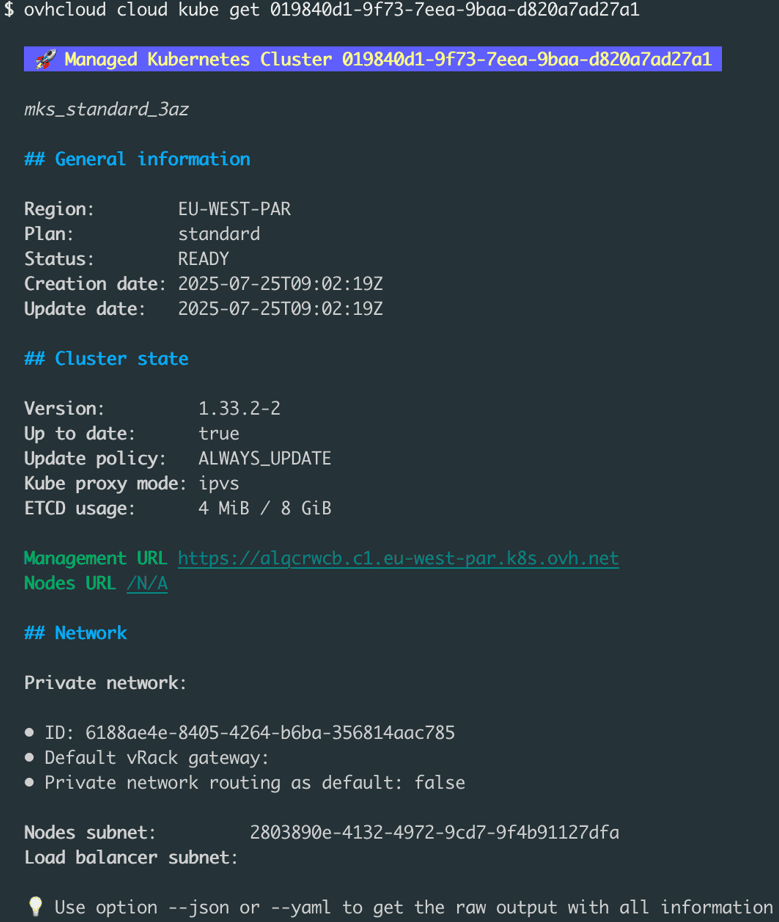
For example, you can create a Managed Kubernetes cluster, a node pool, easily get its kubeconfig file and update the cluster.
Documentation and help
OVHcloud CLI is generally available since November 19th, 2026.
Documentation
- Getting started with OVHcloud CLI: install the CLI, authenticate and run your first commands.
- Services coverage: the full list of supported services and commands.
Share your feedback
Coverage keeps growing. Request a feature or report an issue on GitHub.
Questions, answered.
OVHcloud CLI is a tool that allows you to manage your OVHcloud services from a terminal. You can, for example, list, create, edit or delete services easily from the terminal.
The full coverage is detailed in the GitHub repository, and in the CLI itself by typing the "ovhcloud -h" command.
Yes. The getting started guide on the OVHcloud documentation center walks you through installation, authentication and your first commands.
Shape what ships next.
Join the User Experience Program to test upcoming products, get early alpha and beta access, and put your fingerprints on the roadmap.